

Build a BPE Tokenizer from Scratch in Python — Step-by-Step Guide
Build a working BPE tokenizer in Python step by step. Learn how LLMs split text into tokens, implement byte pair encoding, and count tokens with tiktoken.
Every time you call an LLM API, your text gets chopped into tokens before the model reads a single word. Different tokenizers produce different token counts — and different bills. Here’s how to build one yourself.
You type “Hello, world!” and send it to GPT-4. The model never sees those characters. It sees a list of numbers like [9906, 11, 1917, 0]. That conversion — text to numbers — is called tokenization.
Tokenization is the very first step in every LLM pipeline. Get it wrong, and your model receives garbage. Understand it well, and you can save money on every API call, debug strange model outputs, and even train custom tokenizers for your domain.
The most common algorithm behind modern tokenizers is Byte Pair Encoding (BPE). GPT-2, GPT-4, Llama 3, and most open-source models use some version of it.
By the end of this guide, you will build a working BPE tokenizer in pure Python. You will also use tiktoken to count tokens the way OpenAI does and learn why token counts hit your wallet.
What Is Tokenization and Why Does It Matter?
LLMs don’t read words. They read numbers. Every word, space, and punctuation mark must be converted into an integer before the model can process it.
This conversion process is called tokenization. A tokenizer splits your input text into small pieces (tokens) and maps each piece to a unique integer ID. The model’s vocabulary is the complete set of tokens it knows.
Why should you care? Three reasons.
Context window limits. Models like GPT-4 have a 128K token limit. Not 128K words — 128K tokens. A single word might use 1 token or 4 tokens depending on the tokenizer. If your prompt uses tokens inefficiently, you hit the limit sooner.
API costs. OpenAI, Anthropic, and Google charge per token. The exact same text can cost different amounts depending on which model you use, because each model has a different tokenizer.
Model behavior. Tokenization affects how a model “sees” your text. If a word gets split into unusual subwords, the model may struggle with it. This is why LLMs sometimes fail at simple spelling tasks — they don’t see individual characters.
Let’s make this concrete. Here is the same sentence tokenized by two different models:
python
# Token counts differ across models
text = "Tokenization affects your API bill."

# GPT-4 (cl100k_base): 6 tokens
# GPT-4o (o200k_base): 6 tokens
# Llama 3: 7 tokens
# A character-level approach: 36 tokens
Same text, different token counts. The tokenizer decides how much you pay.
Three Approaches to Tokenization
Before diving into BPE, let’s see why it exists. There are three main strategies for splitting text into tokens, and each has clear trade-offs.
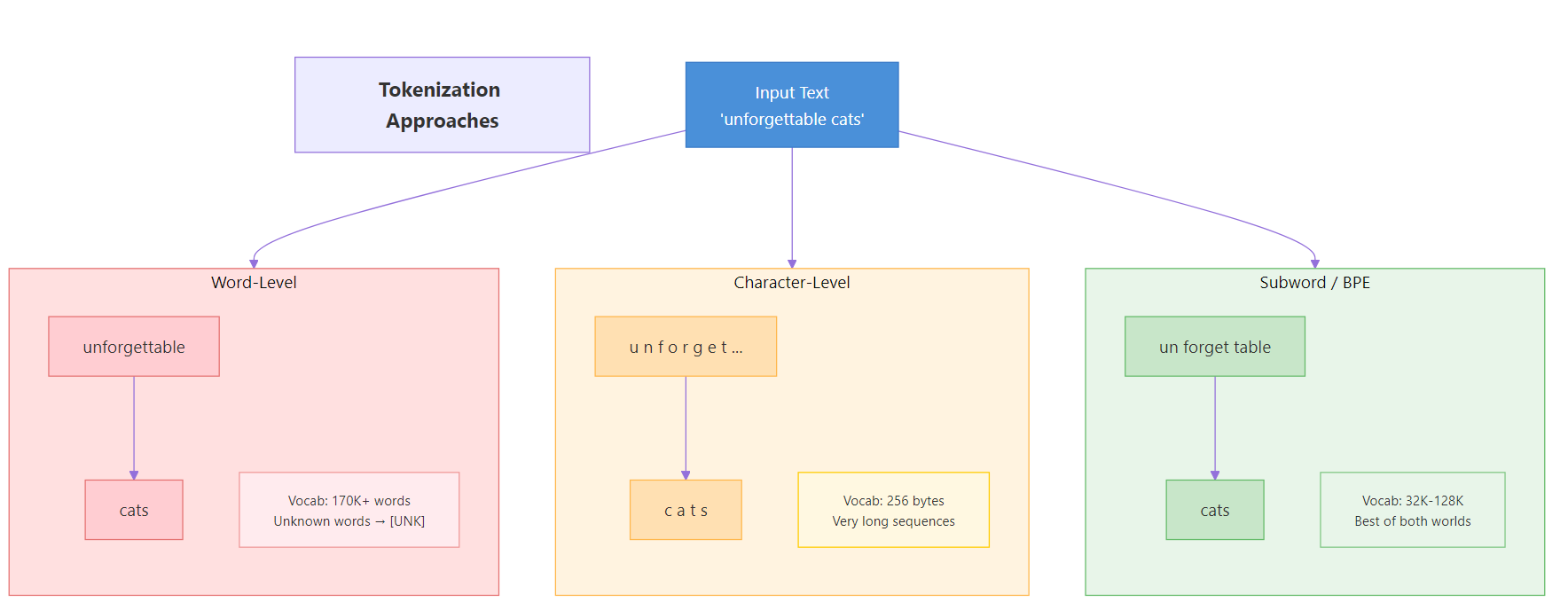
Figure 1: Three tokenization strategies — word-level, character-level, and subword-level — and their trade-offs.
Word-Level Tokenization
The simplest idea: split on spaces and punctuation. Each word becomes one token.
text = "The cat sat on the mat."
tokens = text.split()
print(tokens)
Output:
python
['The', 'cat', 'sat', 'on', 'the', 'mat.']
This works until the model encounters a word it has never seen. “Unforgettable” might not be in the vocabulary. When that happens, the tokenizer outputs an [UNK] (unknown) token, and the model loses all information about that word.
Word-level tokenizers also need enormous vocabularies. English alone has over 170,000 words in current use. Add technical jargon, names, and misspellings, and the vocabulary explodes.
Character-Level Tokenization
The opposite extreme: split into individual characters. The vocabulary is tiny (around 256 for byte-level), and every possible word can be represented.
text = "Hello"
tokens = list(text)
print(tokens)
Output:
python
['H', 'e', 'l', 'l', 'o']
The problem? Sequences become very long. A 100-word paragraph might become 500+ tokens. This slows down training, eats up context windows, and makes it harder for the model to learn word-level patterns. The letter “H” by itself carries almost no meaning.
Subword Tokenization (The BPE Solution)
BPE sits in the sweet spot. It breaks text into subword units — pieces larger than characters but smaller than full words. Common words stay as single tokens. Rare words get split into meaningful parts.
python
# How BPE might tokenize "unforgettable"
# → ["un", "forget", "table"]  (3 tokens)

# How BPE might tokenize "cat"
# → ["cat"]  (1 token — common word stays whole)
This gives us three benefits at once. The vocabulary stays manageable (typically 32K-128K tokens). Unknown words can always be represented by combining known subwords. And common words use just one token, keeping sequences short.
Here’s how the three approaches compare:
| Feature | Word-Level | Character-Level | Subword (BPE) |
|---|---|---|---|
| Vocabulary size | Very large (100K+) | Tiny (256) | Medium (32K-128K) |
| Handles unknown words | No ([UNK]) | Yes | Yes |
| Sequence length | Short | Very long | Medium |
| Meaning per token | High | Very low | Medium-high |
| Used by modern LLMs | Rarely | Rarely | Almost always |
Key Insight: BPE finds the sweet spot between character-level and word-level tokenization. Common words stay as single tokens (fast), while rare words split into known subwords (no unknowns). This is why virtually every modern LLM uses some form of BPE.
How Byte Pair Encoding Works
BPE was originally a data compression algorithm, invented by Philip Gage in 1994. The NLP community adapted it for tokenization in 2016, when Sennrich et al. showed it could handle open-vocabulary translation.
The core idea is beautifully simple: start with individual bytes, then repeatedly merge the most frequent adjacent pair into a new token. After enough merges, common words become single tokens while rare words remain as combinations of smaller pieces.
The Algorithm in Five Steps
Here is the BPE training algorithm:
Start with bytes. Convert your training text to a sequence of bytes (integers 0-255). This is your initial token sequence. Your initial vocabulary has 256 entries — one per byte.
Count pairs. Scan the token sequence and count how often each pair of adjacent tokens appears.
Find the top pair. Pick the pair with the highest frequency.
Merge. Replace every occurrence of that pair in the sequence with a new token ID (256, then 257, then 258, and so on).
Repeat. Go back to step 2. Keep merging until your vocabulary reaches the desired size.
That’s it. The entire algorithm is a loop of count-merge-repeat.

Figure 2: The BPE merge process — starting from bytes, the algorithm repeatedly merges the most frequent pair to build up the vocabulary.
Worked Example
Let’s trace through BPE on a tiny text: "aab aab ab". We will target a vocabulary size of 258 (256 base bytes + 2 new merges).
Initial state: Convert to bytes. The relevant bytes are a=97, b=98, space=32.
python
Token sequence: [97, 97, 98, 32, 97, 97, 98, 32, 97, 98]
Vocabulary: {0-255} (all single bytes)
Iteration 1: Count adjacent pairs.
– (97, 97) appears 2 times — “aa” in “aab” twice
– (97, 98) appears 3 times — “ab” appears three times total
– (98, 32) appears 2 times — “b ”
– (32, 97) appears 2 times — ” a”
The most frequent pair is (97, 98) with 3 occurrences. Merge it into token 256.
python
Token sequence: [97, 256, 32, 97, 256, 32, 256]
Vocabulary: {0-255, 256="ab"}
The sequence shrank from 10 tokens to 7. That’s compression.
Iteration 2: Count pairs again on the new sequence.
– (97, 256) appears 2 times — “a” followed by “ab”
– (256, 32) appears 2 times — “ab” followed by space
– (32, 97) appears 1 time
– (32, 256) appears 1 time
Tie between (97, 256) and (256, 32). We pick (97, 256) and merge into token 257.
python
Token sequence: [257, 32, 257, 32, 256]
Vocabulary: {0-255, 256="ab", 257="aab"}
Down to 5 tokens from the original 10. We have reached our target vocab size of 258, so training stops.
Tip: The order of merges matters. During encoding, you must apply merges in the exact same order they were learned during training. Applying merge 257 before merge 256 would produce wrong results because 257 depends on 256 existing first.
Build the BPE Tokenizer Step by Step
Now let’s implement this in Python. We will build each piece one function at a time, then combine them into a complete tokenizer class.
Step 1 — Convert Text to Bytes
The foundation of byte-level BPE is converting text into raw bytes. Python makes this easy with UTF-8 encoding. Every character becomes one or more bytes (integers 0-255), giving us a base vocabulary of exactly 256 tokens.
text = "the cat in the hat"
tokens = list(text.encode("utf-8"))
print(tokens)
print(f"Number of tokens: {len(tokens)}")
Output:
python
[116, 104, 101, 32, 99, 97, 116, 32, 105, 110, 32, 116, 104, 101, 32, 104, 97, 116]
Number of tokens: 18
Each byte maps to a number. The letter “t” is 116, “h” is 104, a space is 32. Our starting point is always these raw bytes.
Note: Why bytes instead of characters? UTF-8 encoding means every possible character (including emojis, Chinese, Arabic) can be represented as a sequence of bytes. This guarantees we never encounter an unknown character — the base vocabulary of 256 bytes covers everything.
Step 2 — Count Pair Frequencies
Next, we need a function that scans a token sequence and counts how often each adjacent pair appears. This is the “counting” step in our algorithm.
def get_pair_counts(token_ids):
    """Count frequency of each adjacent pair in the token sequence."""
    counts = {}
    for i in range(len(token_ids) - 1):
        pair = (token_ids[i], token_ids[i + 1])
        counts[pair] = counts.get(pair, 0) + 1
    return counts

# Test it
text = "the cat in the hat"
tokens = list(text.encode("utf-8"))
pair_counts = get_pair_counts(tokens)

# Show top 5 most frequent pairs
top_pairs = sorted(pair_counts.items(), key=lambda x: x[1], reverse=True)[:5]
for pair, count in top_pairs:
    print(f"({chr(pair[0])}, {chr(pair[1])}) -> count: {count}")
Output:
python
(t, h) → count: 3
(h, e) → count: 2
( , t) → count: 2
(a, t) → count: 2
(h, a) → count: 1
The pair (116, 104) — which is (“t”, “h”) — appears 3 times. That will be our first merge.
Step 3 — Merge the Most Frequent Pair
Now we need a function that takes a token sequence, finds a specific pair, and replaces every occurrence of that pair with a new token ID.
def merge(token_ids, pair, new_id):
    """Replace all occurrences of pair in token_ids with new_id."""
    new_tokens = []
    i = 0
    while i < len(token_ids):
        # If we found the pair, merge it
        if i < len(token_ids) - 1 and (token_ids[i], token_ids[i + 1]) == pair:
            new_tokens.append(new_id)
            i += 2  # Skip both tokens in the pair
        else:
            new_tokens.append(token_ids[i])
            i += 1
    return new_tokens

# Test: merge the pair (116, 104) -> "th" into token 256
tokens = list("the cat in the hat".encode("utf-8"))
print(f"Before: {len(tokens)} tokens")

merged = merge(tokens, (116, 104), 256)
print(f"After:  {len(merged)} tokens")
print(f"Merged sequence: {merged}")
Output:
python
Before: 18 tokens
After:  15 tokens
Merged sequence: [256, 101, 32, 99, 97, 116, 32, 105, 110, 32, 256, 101, 32, 104, 97, 116]
Three occurrences of “th” (tokens 116, 104) got replaced by the single token 256. The sequence shrank from 18 to 15 tokens.
Step 4 — Train the Tokenizer
Training means running the count-merge loop until we reach our target vocabulary size. Each iteration adds one new token, so if we want a vocabulary of 276 (256 base + 20 merges), we run 20 iterations.
The train function records each merge rule so we can replay them later during encoding.
def get_pair_counts(token_ids):
    counts = {}
    for i in range(len(token_ids) - 1):
        pair = (token_ids[i], token_ids[i + 1])
        counts[pair] = counts.get(pair, 0) + 1
    return counts

def merge(token_ids, pair, new_id):
    new_tokens = []
    i = 0
    while i < len(token_ids):
        if i < len(token_ids) - 1 and (token_ids[i], token_ids[i + 1]) == pair:
            new_tokens.append(new_id)
            i += 2
        else:
            new_tokens.append(token_ids[i])
            i += 1
    return new_tokens

def train(text, vocab_size):
    """Train BPE on text, returning merge rules and vocabulary."""
    assert vocab_size >= 256, "Vocab size must be at least 256"
    num_merges = vocab_size - 256

    tokens = list(text.encode("utf-8"))
    merges = {}
    vocab = {i: bytes([i]) for i in range(256)}

    for i in range(num_merges):
        pair_counts = get_pair_counts(tokens)
        if not pair_counts:
            break

        best_pair = max(pair_counts, key=pair_counts.get)
        new_id = 256 + i
        tokens = merge(tokens, best_pair, new_id)
        merges[best_pair] = new_id
        vocab[new_id] = vocab[best_pair[0]] + vocab[best_pair[1]]

        print(f"Merge {i+1}: {best_pair} -> {new_id} "
              f"({vocab[new_id]}) | Tokens: {len(tokens)}")

    return merges, vocab

# Train on sample text with vocab_size = 266 (10 merges)
training_text = "the cat in the hat sat on the mat. the cat and the hat."
merges, vocab = train(training_text, vocab_size=266)
Output:
python
Merge 1: (116, 104) → 256 (b'th') | Tokens: 49
Merge 2: (256, 101) → 257 (b'the') | Tokens: 44
Merge 3: (32, 257) → 258 (b' the') | Tokens: 40
Merge 4: (97, 116) → 259 (b'at') | Tokens: 36
Merge 5: (32, 99) → 260 (b' c') | Tokens: 34
Merge 6: (260, 259) → 261 (b' cat') | Tokens: 32
Merge 7: (258, 32) → 262 (b' the ') | Tokens: 28
Merge 8: (32, 115) → 263 (b' s') | Tokens: 27
Merge 9: (46, 262) → 264 (b'. the ') | Tokens: 26
Merge 10: (104, 259) → 265 (b'hat') | Tokens: 24
Watch how the algorithm builds up tokens progressively. First it learns “th” (merge 1), then “the” (merge 2), then ” the” with the leading space (merge 3). Each merge shrinks the token sequence further. By merge 10, our 55-character text is down to just 24 tokens.
Key Insight: BPE learns a hierarchy of merges. Early merges capture common character pairs like “th”. Later merges build on earlier ones to form full words like “the” and even phrases like “. the “. This hierarchy is why merge order matters during encoding.
Step 5 — Encode Text
Encoding means tokenizing new text using the merge rules we learned during training. The process is: convert to bytes, then apply each merge rule in the order it was learned.
def get_pair_counts(token_ids):
    counts = {}
    for i in range(len(token_ids) - 1):
        pair = (token_ids[i], token_ids[i + 1])
        counts[pair] = counts.get(pair, 0) + 1
    return counts

def merge(token_ids, pair, new_id):
    new_tokens = []
    i = 0
    while i < len(token_ids):
        if i < len(token_ids) - 1 and (token_ids[i], token_ids[i + 1]) == pair:
            new_tokens.append(new_id)
            i += 2
        else:
            new_tokens.append(token_ids[i])
            i += 1
    return new_tokens

def train(text, vocab_size):
    tokens = list(text.encode("utf-8"))
    merges = {}
    vocab = {i: bytes([i]) for i in range(256)}
    for i in range(vocab_size - 256):
        pair_counts = get_pair_counts(tokens)
        if not pair_counts:
            break
        best_pair = max(pair_counts, key=pair_counts.get)
        new_id = 256 + i
        tokens = merge(tokens, best_pair, new_id)
        merges[best_pair] = new_id
        vocab[new_id] = vocab[best_pair[0]] + vocab[best_pair[1]]
    return merges, vocab

def encode(text, merges):
    """Encode text into token IDs using learned merge rules."""
    tokens = list(text.encode("utf-8"))
    while len(tokens) >= 2:
        pair_counts = get_pair_counts(tokens)
        candidate = None
        for pair in pair_counts:
            if pair in merges:
                if candidate is None or merges[pair] < merges[candidate]:
                    candidate = pair
        if candidate is None:
            break
        tokens = merge(tokens, candidate, merges[candidate])
    return tokens

# Train first, then encode
training_text = "the cat in the hat sat on the mat. the cat and the hat."
merges, vocab = train(training_text, vocab_size=266)

encoded = encode("the cat in the hat", merges)
print(f"Encoded: {encoded}")
print(f"Number of tokens: {len(encoded)}")
Output:
python
Encoded: [258, 261, 32, 105, 110, 262, 265]
Number of tokens: 7
The original 18 bytes compressed down to 7 tokens. The tokenizer recognized " the" (258), " cat" (261), and "hat" (265) as single tokens because it learned those patterns during training.
Step 6 — Decode Tokens Back to Text
Decoding is the reverse: map each token ID back to its byte sequence, concatenate, and convert to a string. This is simpler than encoding because we just need a lookup table.
def get_pair_counts(token_ids):
    counts = {}
    for i in range(len(token_ids) - 1):
        pair = (token_ids[i], token_ids[i + 1])
        counts[pair] = counts.get(pair, 0) + 1
    return counts

def merge(token_ids, pair, new_id):
    new_tokens = []
    i = 0
    while i < len(token_ids):
        if i < len(token_ids) - 1 and (token_ids[i], token_ids[i + 1]) == pair:
            new_tokens.append(new_id)
            i += 2
        else:
            new_tokens.append(token_ids[i])
            i += 1
    return new_tokens

def train(text, vocab_size):
    tokens = list(text.encode("utf-8"))
    merges = {}
    vocab = {i: bytes([i]) for i in range(256)}
    for i in range(vocab_size - 256):
        pair_counts = get_pair_counts(tokens)
        if not pair_counts:
            break
        best_pair = max(pair_counts, key=pair_counts.get)
        new_id = 256 + i
        tokens = merge(tokens, best_pair, new_id)
        merges[best_pair] = new_id
        vocab[new_id] = vocab[best_pair[0]] + vocab[best_pair[1]]
    return merges, vocab

def encode(text, merges):
    tokens = list(text.encode("utf-8"))
    while len(tokens) >= 2:
        pair_counts = get_pair_counts(tokens)
        candidate = None
        for pair in pair_counts:
            if pair in merges:
                if candidate is None or merges[pair] < merges[candidate]:
                    candidate = pair
        if candidate is None:
            break
        tokens = merge(tokens, candidate, merges[candidate])
    return tokens

def decode(token_ids, vocab):
    """Decode token IDs back to text."""
    byte_sequence = b"".join(vocab[tid] for tid in token_ids)
    return byte_sequence.decode("utf-8", errors="replace")

# Train, encode, then decode
training_text = "the cat in the hat sat on the mat. the cat and the hat."
merges, vocab = train(training_text, vocab_size=266)
encoded = encode("the cat in the hat", merges)

decoded = decode(encoded, vocab)
print(f"Decoded: '{decoded}'")
print(f"Round-trip matches: {decoded == 'the cat in the hat'}")
Output:
python
Decoded: 'the cat in the hat'
Round-trip matches: True
The encode-decode round trip preserves the original text perfectly. This is a fundamental requirement — a tokenizer that loses information during encoding is useless.
🏋️ Exercise 1: Experiment with Vocabulary Size
Train the BPE tokenizer on the text below with two different vocabulary sizes: 260 and 280. Compare how many tokens each produces when encoding the test sentence. Which vocab size compresses better?
def get_pair_counts(token_ids):
    counts = {}
    for i in range(len(token_ids) - 1):
        pair = (token_ids[i], token_ids[i + 1])
        counts[pair] = counts.get(pair, 0) + 1
    return counts

def merge(token_ids, pair, new_id):
    new_tokens = []
    i = 0
    while i < len(token_ids):
        if i < len(token_ids) - 1 and (token_ids[i], token_ids[i + 1]) == pair:
            new_tokens.append(new_id)
            i += 2
        else:
            new_tokens.append(token_ids[i])
            i += 1
    return new_tokens

def train(text, vocab_size):
    tokens = list(text.encode("utf-8"))
    merges = {}
    vocab = {i: bytes([i]) for i in range(256)}
    for i in range(vocab_size - 256):
        pair_counts = get_pair_counts(tokens)
        if not pair_counts:
            break
        best_pair = max(pair_counts, key=pair_counts.get)
        new_id = 256 + i
        tokens = merge(tokens, best_pair, new_id)
        merges[best_pair] = new_id
        vocab[new_id] = vocab[best_pair[0]] + vocab[best_pair[1]]
    return merges, vocab

def encode(text, merges):
    tokens = list(text.encode("utf-8"))
    while len(tokens) >= 2:
        pair_counts = get_pair_counts(tokens)
        candidate = None
        for pair in pair_counts:
            if pair in merges:
                if candidate is None or merges[pair] < merges[candidate]:
                    candidate = pair
        if candidate is None:
            break
        tokens = merge(tokens, candidate, merges[candidate])
    return tokens

# Training text
corpus = "the cat in the hat sat on the mat. the cat and the hat. the cat is a fat cat."

# TODO: Train with vocab_size=260 and vocab_size=280
# Then encode this test sentence with both and compare token counts
test_sentence = "the fat cat sat on the mat"
# Your code here:
print("Vocab 260 tokens:", "???")
print("Vocab 280 tokens:", "???")
Put It All Together — The Complete BPETokenizer Class
Let's wrap everything into a clean Python class. This combines training, encoding, and decoding into a single reusable object.
class BPETokenizer:
    """A minimal byte-level BPE tokenizer for educational purposes."""

    def __init__(self):
        self.merges = {}
        self.vocab = {}

    def train(self, text, vocab_size):
        assert vocab_size >= 256
        num_merges = vocab_size - 256
        tokens = list(text.encode("utf-8"))
        self.merges = {}
        self.vocab = {i: bytes([i]) for i in range(256)}
        for i in range(num_merges):
            pair_counts = self._get_pair_counts(tokens)
            if not pair_counts:
                break
            best_pair = max(pair_counts, key=pair_counts.get)
            new_id = 256 + i
            tokens = self._merge(tokens, best_pair, new_id)
            self.merges[best_pair] = new_id
            self.vocab[new_id] = (self.vocab[best_pair[0]]
                                  + self.vocab[best_pair[1]])
        print(f"Trained: {len(self.merges)} merges, "
              f"vocab size = {len(self.vocab)}")

    def encode(self, text):
        tokens = list(text.encode("utf-8"))
        while len(tokens) >= 2:
            pair_counts = self._get_pair_counts(tokens)
            candidate = None
            for pair in pair_counts:
                if pair in self.merges:
                    if (candidate is None
                            or self.merges[pair] < self.merges[candidate]):
                        candidate = pair
            if candidate is None:
                break
            tokens = self._merge(tokens, candidate, self.merges[candidate])
        return tokens

    def decode(self, token_ids):
        byte_seq = b"".join(self.vocab[tid] for tid in token_ids)
        return byte_seq.decode("utf-8", errors="replace")

    def _get_pair_counts(self, token_ids):
        counts = {}
        for i in range(len(token_ids) - 1):
            pair = (token_ids[i], token_ids[i + 1])
            counts[pair] = counts.get(pair, 0) + 1
        return counts

    def _merge(self, token_ids, pair, new_id):
        new_tokens = []
        i = 0
        while i < len(token_ids):
            if (i < len(token_ids) - 1
                    and (token_ids[i], token_ids[i + 1]) == pair):
                new_tokens.append(new_id)
                i += 2
            else:
                new_tokens.append(token_ids[i])
                i += 1
        return new_tokens

# Demo
tokenizer = BPETokenizer()
training_corpus = (
    "the cat in the hat sat on the mat. "
    "the cat and the hat. "
    "the cat is a fat cat."
)
tokenizer.train(training_corpus, vocab_size=276)

test = "the cat sat on the mat"
encoded = tokenizer.encode(test)
decoded = tokenizer.decode(encoded)
print(f"\nOriginal:  '{test}'")
print(f"Encoded:   {encoded} ({len(encoded)} tokens)")
print(f"Decoded:   '{decoded}'")
print(f"Match:     {test == decoded}")
Output:
python
Trained: 20 merges, vocab size = 276

Original:  'the cat sat on the mat'
Encoded:   [262, 261, 263, 259, 32, 111, 110, 262, 109, 259] (10 tokens)
Decoded:   'the cat sat on the mat'
Match:     True
The 22-character input compressed to 10 tokens. Common patterns like " the " and " cat" are single tokens, while less frequent parts like "on" remain as individual bytes.
Why GPT-4 Uses Regex Preprocessing
Our basic BPE tokenizer has a problem. It merges tokens across word boundaries. For example, the space at the end of one word might merge with the first letter of the next word, creating tokens like " t" or "e ".
This is technically valid, but it creates strange tokens. GPT-2 introduced a clever fix: split the text into chunks using a regex pattern before running BPE. Each chunk is tokenized independently, which prevents merges from crossing word boundaries.
Here is the regex pattern that GPT-2 uses:
import re

GPT2_PATTERN = r"""'s|'t|'re|'ve|'m|'ll|'d| ?\w+| ?\d+| ?[^\s\w\d]+|\s+"""

text = "Hello world! It's a test_123."
chunks = re.findall(GPT2_PATTERN, text)
print(chunks)
Output:
python
["Hello", " world", "!", " It", "'s", " a", " test", "_", "123", "."]

Figure 3: The regex-BPE pipeline — text is first split into chunks by regex, then each chunk is tokenized by BPE independently.
The pattern handles contractions ('s, 't, 're), keeps words together with their leading space, separates numbers, and isolates punctuation. BPE then runs on each chunk separately, so a merge can never span from "world" into "!".
GPT-4 uses an updated regex pattern with better handling of numbers and whitespace. Karpathy's minbpe project provides both patterns for reference.
Warning: Don't skip regex preprocessing if you want production-quality tokenization. Without it, your tokenizer will create strange tokens that span word boundaries. These hurt model performance because the token vocabulary wastes slots on meaningless combinations like `"e "` or `" t"`.
Adding Regex to Our Tokenizer
Let's upgrade our BPETokenizer to use regex preprocessing. The change is small — we split the text into chunks before converting to bytes, then train and encode on each chunk separately.
import re

class BPETokenizer:
    def __init__(self):
        self.merges = {}
        self.vocab = {}
    def _get_pair_counts(self, token_ids):
        counts = {}
        for i in range(len(token_ids) - 1):
            pair = (token_ids[i], token_ids[i + 1])
            counts[pair] = counts.get(pair, 0) + 1
        return counts
    def _merge(self, token_ids, pair, new_id):
        new_tokens = []
        i = 0
        while i < len(token_ids):
            if (i < len(token_ids) - 1
                    and (token_ids[i], token_ids[i + 1]) == pair):
                new_tokens.append(new_id)
                i += 2
            else:
                new_tokens.append(token_ids[i])
                i += 1
        return new_tokens
    def decode(self, token_ids):
        byte_seq = b"".join(self.vocab[tid] for tid in token_ids)
        return byte_seq.decode("utf-8", errors="replace")

class RegexBPETokenizer(BPETokenizer):
    """BPE tokenizer with regex-based text splitting."""
    def __init__(self, pattern=None):
        super().__init__()
        self.pattern = pattern or (
            r"""'s|'t|'re|'ve|'m|'ll|'d"""
            r"""| ?\w+| ?\d+| ?[^\s\w\d]+|\s+""")
    def train(self, text, vocab_size):
        assert vocab_size >= 256
        chunks = re.findall(self.pattern, text)
        all_chunk_tokens = [list(ch.encode("utf-8")) for ch in chunks]
        self.merges = {}
        self.vocab = {i: bytes([i]) for i in range(256)}
        for i in range(vocab_size - 256):
            pair_counts = {}
            for ct in all_chunk_tokens:
                for pair, count in self._get_pair_counts(ct).items():
                    pair_counts[pair] = pair_counts.get(pair, 0) + count
            if not pair_counts:
                break
            best_pair = max(pair_counts, key=pair_counts.get)
            new_id = 256 + i
            all_chunk_tokens = [self._merge(ct, best_pair, new_id) for ct in all_chunk_tokens]
            self.merges[best_pair] = new_id
            self.vocab[new_id] = self.vocab[best_pair[0]] + self.vocab[best_pair[1]]
        print(f"Trained: {len(self.merges)} merges, vocab size = {len(self.vocab)}")
    def encode(self, text):
        chunks = re.findall(self.pattern, text)
        all_tokens = []
        for chunk in chunks:
            tokens = list(chunk.encode("utf-8"))
            while len(tokens) >= 2:
                pair_counts = self._get_pair_counts(tokens)
                candidate = None
                for pair in pair_counts:
                    if pair in self.merges:
                        if candidate is None or self.merges[pair] < self.merges[candidate]:
                            candidate = pair
                if candidate is None:
                    break
                tokens = self._merge(tokens, candidate, self.merges[candidate])
            all_tokens.extend(tokens)
        return all_tokens

# Demo
training_corpus = "the cat in the hat sat on the mat. the cat and the hat. the cat is a fat cat."
regex_tok = RegexBPETokenizer()
regex_tok.train(training_corpus, vocab_size=276)

test = "the cat sat on the mat"
encoded = regex_tok.encode(test)
decoded = regex_tok.decode(encoded)
print(f"\nEncoded: {encoded} ({len(encoded)} tokens)")
print(f"Decoded: '{decoded}'")
Output:
python
Trained: 20 merges, vocab size = 276

Encoded: [258, 261, 263, 259, 32, 111, 110, 258, 109, 259] (10 tokens)
Decoded: 'the cat sat on the mat'
The regex tokenizer produces cleaner tokens because it never merges across word boundaries. In production, this leads to a more useful vocabulary.
Count Tokens Like the Pros with tiktoken
Building a tokenizer from scratch teaches you how BPE works. But for real work — counting tokens, estimating costs, debugging prompts — you should use a production library.
OpenAI's tiktoken library is the fastest option. It implements the exact tokenizers used by GPT-3.5, GPT-4, and GPT-4o.
python
import tiktoken

# Load the GPT-4 tokenizer
enc = tiktoken.get_encoding("cl100k_base")

text = "Build a BPE tokenizer from scratch in Python."
tokens = enc.encode(text)

print(f"Text: '{text}'")
print(f"Token IDs: {tokens}")
print(f"Token count: {len(tokens)}")

# See what each token looks like
for tid in tokens:
    print(f"  {tid} → '{enc.decode([tid])}'")
Output:
python
Text: 'Build a BPE tokenizer from scratch in Python.'
Token IDs: [11313, 264, 426, 1777, 47058, 505, 19307, 304, 13325, 13]
Token count: 10

  11313 → 'Build'
  264 → ' a'
  426 → ' B'
  1777 → 'PE'
  47058 → ' tokenizer'
  505 → ' from'
  19307 → ' scratch'
  304 → ' in'
  13325 → ' Python'
  13 → '.'
Compare Encodings Across Models
Different models use different tokenizers. Let's compare the two most common OpenAI encodings.
python
import tiktoken

text = "Tokenization is the first step in any LLM pipeline."

encodings = {
    "cl100k_base (GPT-4)": tiktoken.get_encoding("cl100k_base"),
    "o200k_base (GPT-4o)": tiktoken.get_encoding("o200k_base"),
}

print(f"Text: '{text}'\n")
for name, enc in encodings.items():
    tokens = enc.encode(text)
    print(f"{name}: {len(tokens)} tokens")
    readable = [enc.decode([t]) for t in tokens]
    print(f"  Tokens: {readable}\n")
Output:
python
Text: 'Tokenization is the first step in any LLM pipeline.'

cl100k_base (GPT-4): 10 tokens
  Tokens: ['Token', 'ization', ' is', ' the', ' first', ' step', ' in', ' any', ' LLM', ' pipeline', '.']

o200k_base (GPT-4o): 9 tokens
  Tokens: ['Tokenization', ' is', ' the', ' first', ' step', ' in', ' any', ' LLM', ' pipeline.']
The GPT-4o tokenizer (o200k_base) has a larger vocabulary (200K vs 100K tokens). This means it can represent more words as single tokens, leading to fewer tokens per text — and lower costs per API call.
Estimate API Costs
Here's a quick utility to estimate costs across models. Knowing your token count before making an API call helps you budget.
python
import tiktoken

def estimate_cost(text, model="gpt-4"):
    """Estimate API input cost for a given text."""
    pricing = {
        "gpt-4": {"encoding": "cl100k_base", "input_per_1k": 0.03},
        "gpt-4o": {"encoding": "o200k_base", "input_per_1k": 0.0025},
        "gpt-4o-mini": {"encoding": "o200k_base", "input_per_1k": 0.00015},
    }

    config = pricing[model]
    enc = tiktoken.get_encoding(config["encoding"])
    num_tokens = len(enc.encode(text))
    cost = (num_tokens / 1000) * config["input_per_1k"]

    return {"model": model, "tokens": num_tokens,
            "cost_usd": round(cost, 6)}

# Compare costs for a typical prompt
prompt = """You are a helpful assistant. Analyze the following text
and provide a summary in 3 bullet points. Focus on the key findings
and their implications for the field of machine learning."""

for model in ["gpt-4", "gpt-4o", "gpt-4o-mini"]:
    result = estimate_cost(prompt, model)
    print(f"{result['model']:>12}: {result['tokens']:>4} tokens"
          f" → ${result['cost_usd']:.6f}")
Output:
python
       gpt-4:   35 tokens → $0.001050
      gpt-4o:   34 tokens → $0.000085
  gpt-4o-mini:   34 tokens → $0.000005
The token count is almost identical across models, but the cost varies by 200x between GPT-4 and GPT-4o-mini. Choosing the right model matters far more than optimizing token count.
🏋️ Exercise 2: Build a Multi-Model Token Calculator
Write a function that takes a text string and prints a comparison table showing token counts and estimated costs for GPT-4, GPT-4o, and GPT-4o-mini.
import tiktoken

def token_cost_comparison(text):
    """Print a comparison table of token counts and costs across models."""
    pricing = {
        "gpt-4": {"encoding": "cl100k_base", "input_per_1k": 0.03},
        "gpt-4o": {"encoding": "o200k_base", "input_per_1k": 0.0025},
        "gpt-4o-mini": {"encoding": "o200k_base", "input_per_1k": 0.00015},
    }
    # TODO: Loop through pricing dict, encode the text, compute cost
    # Print a formatted table with model, tokens, and cost columns
    pass

# Test with this text
test_text = "Machine learning models require careful tokenization to process natural language efficiently."
token_cost_comparison(test_text)
Vocab Sizes Across Popular LLMs
Different models choose different vocabulary sizes. The choice is a trade-off between compression efficiency and memory cost.
A larger vocabulary means more common words become single tokens, which means shorter sequences and more context per window. But a larger vocabulary also means a bigger embedding table — the matrix that maps each token ID to a vector of numbers the model uses internally.
Here's how popular models compare:
| Model | Vocab Size | Tokenizer | Byte-Level BPE |
|---|---|---|---|
| GPT-2 | 50,257 | tiktoken / BPE | Yes |
| GPT-3.5 / GPT-4 | 100,256 | cl100k_base | Yes |
| GPT-4o | 199,997 | o200k_base | Yes |
| Llama 2 | 32,000 | SentencePiece / BPE | Yes |
| Llama 3 | 128,256 | tiktoken-based / BPE | Yes |
| Claude (Anthropic) | ~100,000 | Custom BPE | Yes |
| Gemini (Google) | 256,000 | SentencePiece | Yes |
Key Insight: Larger vocabulary = fewer tokens per text = more content fits in the context window. GPT-4o's 200K vocabulary is 4x larger than GPT-2's 50K, which means it can fit roughly 1.3x more text in the same context window for English text. The trade-off is a larger embedding matrix that uses more memory.
The trend is clear: newer models use bigger vocabularies. GPT-2 (2019) had 50K tokens. GPT-4o (2024) has 200K. Llama jumped from 32K in version 2 to 128K in version 3.
Why the increase? Researchers found that larger vocabularies improve efficiency without hurting model quality. The extra memory cost is negligible compared to the total model size. A 200K vocabulary with 4096-dimension embeddings adds about 800MB — small compared to a 70B parameter model.
Common Mistakes and How to Fix Them
Mistake 1: Treating Text as ASCII Instead of UTF-8
This silently corrupts any text with non-ASCII characters — accents, emojis, CJK text.
❌ Wrong:
python
# This crashes on non-ASCII characters
text = "cafe\u0301"
tokens = [ord(c) for c in text]  # ord('e\u0301') may fail
# Some implementations use ASCII encoding which drops characters
Why it's wrong: ASCII only covers 128 characters. Any character outside that range either crashes or gets silently replaced with a placeholder.
✅ Correct:
text = "caf\u00e9"
tokens = list(text.encode("utf-8"))
print(tokens)
print(f"Characters: {len(text)}, Bytes: {len(tokens)}")
Output:
python
[99, 97, 102, 195, 169]
UTF-8 encoding handles every Unicode character by using 1-4 bytes per character. This is why byte-level BPE uses a base vocabulary of 256 — it covers every possible byte value.
Mistake 2: Applying Merges in the Wrong Order
During encoding, merges MUST be applied in the order they were learned during training. Applying later merges first produces wrong tokens.
❌ Wrong:
python
# Applying merges in arbitrary order
for pair, new_id in merges.items():
    tokens = merge(tokens, pair, new_id)
Why it's wrong: Later merges depend on earlier merges. If merge 257 = ("a", 256) and merge 256 = ("t", "h"), you must create 256 first. Applying 257 before 256 means the token 256 doesn't exist yet.
✅ Correct:
python
# Apply merges by finding the lowest-ranked applicable pair each iteration
while True:
    pair_counts = get_pair_counts(tokens)
    candidate = None
    for pair in pair_counts:
        if pair in merges:
            if candidate is None or merges[pair] < merges[candidate]:
                candidate = pair
    if candidate is None:
        break
    tokens = merge(tokens, candidate, merges[candidate])
The correct approach always picks the merge with the smallest token ID (earliest learned) among all applicable pairs.
Mistake 3: Confusing Token Count with Word Count
API limits and pricing are in tokens, not words. Assuming 1 word equals 1 token leads to budget overruns.
❌ Wrong:
python
word_count = len(text.split())
estimated_cost = (word_count / 1000) * price_per_1k  # Wrong!
Why it's wrong: The ratio of tokens to words varies by language and content. English averages about 1.3 tokens per word. Code can be 2-3 tokens per word. Non-Latin scripts can be 3-4 tokens per word.
✅ Correct:
python
import tiktoken

enc = tiktoken.get_encoding("cl100k_base")
token_count = len(enc.encode(text))
estimated_cost = (token_count / 1000) * price_per_1k
Always count tokens with the model's actual tokenizer before estimating costs.
Mistake 4: Not Handling Special Tokens
Production tokenizers have special tokens like <|endoftext|> that should never be created from regular text. If you don't handle them, a user could inject special tokens into their input.
❌ Wrong:
python
# Encoding user input that contains special token strings
user_input = "Send <|endoftext|> to reset"
tokens = tokenizer.encode(user_input)  # Might create the actual special token!
✅ Correct:
python
import tiktoken

enc = tiktoken.get_encoding("cl100k_base")

# tiktoken requires explicit opt-in for special tokens
tokens = enc.encode(user_input)  # Safe — special tokens not processed
tokens = enc.encode(user_input,
                    allowed_special="all")  # Only when you trust the input
The tiktoken library prevents accidental special token creation by default. You must explicitly allow them with the allowed_special parameter.
🏋️ Exercise 3: Debug the Broken Tokenizer
The code below has a bug in the encoding function. The merges are being applied in the wrong order, producing incorrect token IDs. Fix the encode function so it applies merges correctly.
def get_pair_counts(token_ids):
    counts = {}
    for i in range(len(token_ids) - 1):
        pair = (token_ids[i], token_ids[i + 1])
        counts[pair] = counts.get(pair, 0) + 1
    return counts

def merge(token_ids, pair, new_id):
    new_tokens = []
    i = 0
    while i < len(token_ids):
        if i < len(token_ids) - 1 and (token_ids[i], token_ids[i + 1]) == pair:
            new_tokens.append(new_id)
            i += 2
        else:
            new_tokens.append(token_ids[i])
            i += 1
    return new_tokens

# Pre-trained merges (in training order)
merges = {(116, 104): 256, (256, 101): 257, (32, 257): 258}

# BUGGY encode function — fix this!
def encode_buggy(text, merges):
    tokens = list(text.encode("utf-8"))
    # Bug: applies ALL merges in dict order instead of finding lowest
    for pair, new_id in merges.items():
        tokens = merge(tokens, pair, new_id)
    return tokens

text = "the cat"
result = encode_buggy(text, merges)
print(f"Buggy result: {result}")
# Expected: the → 258 (space+the), then remaining bytes
# Fix the encode function below:

def encode_fixed(text, merges):
    tokens = list(text.encode("utf-8"))
    # YOUR FIX HERE
    return tokens

fixed = encode_fixed(text, merges)
print(f"Fixed result: {fixed}")
Frequently Asked Questions
Is BPE the only tokenization algorithm used by LLMs?
No. WordPiece (used by BERT and DistilBERT) is similar but uses a likelihood-based scoring instead of raw frequency. Unigram (used by T5 and mBART) starts with a large vocabulary and prunes it down. SentencePiece is a library that can implement both BPE and Unigram. However, most autoregressive LLMs (GPT family, Llama, Mistral) use BPE because it is simple, fast, and effective.
Can I train a custom tokenizer for my domain?
Yes, and it can improve efficiency significantly. If your domain uses specialized vocabulary (medical terms, code identifiers, chemical formulas), a general-purpose tokenizer will split those terms into many subwords. Training a custom tokenizer on domain-specific text creates single tokens for common domain terms. The HuggingFace tokenizers library and Karpathy's minbpe project both support training custom BPE tokenizers.
How does tokenization affect multilingual text?
Multilingual text is often tokenized less efficiently. Most tokenizers are trained primarily on English text, so English words tend to be single tokens while words in other languages get split into more pieces. For example, the Chinese character "ni" might use 3 tokens while the English word "you" uses 1 token. This means non-English users pay more per word and fit less text in the context window. Newer models like Llama 3 and GPT-4o have improved multilingual tokenization by training on more diverse data.
What is the difference between tiktoken and the HuggingFace tokenizers library?
tiktoken is OpenAI's library that loads pretrained tokenizers (you cannot train new ones with it). It is extremely fast because the core is written in Rust. The HuggingFace tokenizers library is more flexible — it supports training custom tokenizers from scratch, multiple algorithms (BPE, WordPiece, Unigram), and integrates with the transformers ecosystem. Use tiktoken for counting tokens with OpenAI models. Use HuggingFace tokenizers for training custom tokenizers or working with non-OpenAI models.
Complete Code
References
- Gage, P. — "A New Algorithm for Data Compression." The C Users Journal, 12(2):23-38 (1994). The original BPE paper.
- Sennrich, R., Haddow, B., & Birch, A. — "Neural Machine Translation of Rare Words with Subword Units." ACL 2016. arXiv:1508.07909. Adapted BPE for NLP tokenization.
- OpenAI tiktoken documentation. Link. The official fast BPE tokenizer library for OpenAI models.
- Karpathy, A. — minbpe: Minimal, clean BPE implementation. Link. Educational BPE implementation with regex preprocessing.
- Hugging Face — Byte-Pair Encoding tokenization. Link. Part of the HuggingFace NLP course.
- Raschka, S. — "Implementing A Byte Pair Encoding (BPE) Tokenizer From Scratch." Link. Comprehensive notebook implementation.
- Radford, A. et al. — "Language Models are Unsupervised Multitask Learners." OpenAI (2019). GPT-2 paper that popularized byte-level BPE.
- Touvron, H. et al. — "Llama 2: Open Foundation and Fine-Tuned Chat Models." Meta AI (2023). arXiv:2307.09288.
Free Course
Master Core Python — Your First Step into AI/ML
Build a strong Python foundation with hands-on exercises designed for aspiring Data Scientists and AI/ML Engineers.
Start Free Course →Trusted by 50,000+ learners

Related Course
Master NLP — Hands-On
Join 5,000+ students at edu.darkorange-mallard-189514.hostingersite.com
Explore Course
Related Articles


